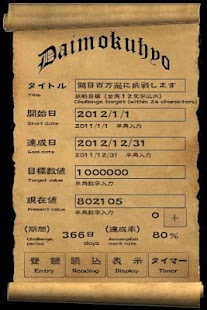
Daimokuhyo
In addition, I think that I become a big result accumulation during a day of a day and can achieve a large target.
Then, this "Daimokuhyo" application program is1.
The motivation happens very much because the interface is simple and the contract of the adventure style.2.
The self management of the target can be done by the figure by filling in hard numbers.3.
The decision is prompted by making a large target a visual character and it clarifies.
4.
"Chinese character - calligraphy" is starting a boom also in Europe and America now.
The stage of completion to accomplishment of a goal can visually be actually felt.
5.
A multi-stage's setup in speed of Daimoku is possible.The tool which calculates the number of Daimoku automatically from a timer was incorporated.
It is possible to peel off and I will surely guide you to large accomplishment of a goal but happily but too not formal.
SGI member becomes "Chant table" according to the title of "Daimokuhyo".
- - - Operation condition of application program - - -
1.
Adobe AIR is used.
2.
At first, reading SWF may take time somewhat.3.
The reaction of a button may become blunt after returning from a timer tool or sleep.
Then, please set between and carry out a tap once again.
- - - Operating manual and the main feature - - -
1.
You input five items on the information screen.
And, it "Entry" button touches.
2.
As for the input value, it is preserved in the cookie with the entry button, and the superscription is preserved every time it changes.
3.
When you do "Reading" button in the touch The challenge period (The set daily allowance day is added) is calculated automatically by the start date and the goal date.
4.
The accomplishment rate is an automatic ticketing (Below decimal point omission ) from a target value and a present value.5.
It is under Present value input box.
Right "+ button" adds the numerical value of a direct entry, and a timer tool input numerical value to the present value.
After touching "+ button" Please be sure for the numerical value added to the input box of the present value to be reflected, and to touche "Entry" button after checking that the numerical value has been set to 0.
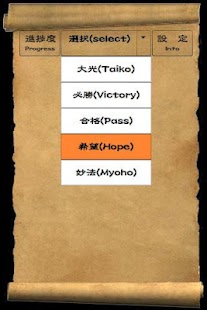
The numerical column will become blank with the entry button.6."Display" button when touching It becomes "Character selection" screen.
The movie of "Chinese character painting out" starts when favorite "Chinese character" is selected.
7.When the tap of the "Progress" button was carried out, a stop indication of the present percent complete is given, and a "Title", "The challenge period by the present", an "Accomplishment rate" and the numerical value "Remaining period" also came to be displayed simultaneously.It can be made the "certificate" at the time of achievement by photographing the screen shot of "percent complete." 8.
Because all "Chinese character painting out" progress level movies consist more than 3000 frames, a correct stage of completion can be understood.
Hereafter, the kind of the Chinese character will be increased fast.
9.
It will become a timer tool if a "Timer" button is touched.
Since it is specializing in the "Chant table", it is the best for the count of the daily number of titles.
- - - The operation method of a timer tool - - -
1.
It is a measurement start with the "Start button." The "Stop button" stops.
It is initialization of a timer with the "Reset button." With the "Save button", the number of Daimoku is calculated autoamatically and it saves.2.
Although the speed 20 (minute) of 1000 Ben is set up by the default, it can change and can carry out a multi-stage setup.
( Usually, 15-20=Default )3.
It returns to the information screen with the "Info button." The number of Daimoku saved with the timer tool on the left-hand side of "+ button" of the information screen is displayed.
About Daimokuhyo
- Package name (App ID)
- air.net.vclab.daimokuhyo
- Available on
- Google Play
- Price
- Free
- Version
- v5.2.0
Looking for the Daimokuhyo APK?
The safest way to get Daimokuhyo (air.net.vclab.daimokuhyo) on your Android device is to install it directly from Google Play — you'll always get the latest official version, automatic updates, and no risk of modified or infected APK files from third-party sites.
Gaming Features
Enjoy immersive gaming experience with various game modes.
Camera Features
Advanced camera features with editing capabilities.
Food & Dining
Discover recipes and order food from your favorite restaurants.
See Daimokuhyo in Action

Frequently Asked Questions
Is Daimokuhyo free?
Yes, Daimokuhyo is free to download and install on Android through Google Play.
How do I install Daimokuhyo on Android?
Open Google Play on your Android phone or tablet, search for Daimokuhyo or tap the Google Play button on this page, then tap Install. The app downloads and installs automatically.
What is air.net.vclab.daimokuhyo?
air.net.vclab.daimokuhyo is the App ID (package name) of Daimokuhyo on Google Play. Every Android app has a unique package name, and it is the safest way to verify you are installing the official app.
Is Daimokuhyo safe to download?
Installing Daimokuhyo from Google Play is the safest option: you get the official version, verified by Google Play Protect, with automatic updates. Avoid APK files from unofficial third-party sites.

Get Daimokuhyo Today
Daimokuhyo for Android — free download on Google Play.
Compatible with Android phones and tablets — available on Google Play.
Ask AI about this app
Get instant answers about features, tips and more from popular AI assistants.